XEL9-ZSecure. Compress. Protect.

Light and fast, kept safe

XEL9-Z is a light yet powerful file archiver. It opens almost any archive, including zip, 7z, rar and ALZip, and protects your important files with strong encryption. Works on Windows, macOS and Linux.

9.8×faster ZIP compressionvs 7-Zip, median across 7 computers
19.8×faster encrypted compressionX9Z vs 7-Zip's encrypted 7z
4.24×size reduction with 7zoriginal size ÷ compressed size; 7-Zip gets 4.27×
879tests, all restored identical to the original7 computers on Windows, macOS and Linux

BENCHMARK

Same result, much less time

We timed XEL9-Z against archivers such as 7-Zip on 7 Windows, macOS and Linux computers, using exactly the same files. Every archive was extracted again and checked against the original. Figures are for XEL9-Z 0.13.0.

At least 8.0× faster than 7-Zip on every machine

Compressing a 212 MB test file set to ZIP · MB processed per second; longer bars are faster

XEL9-Z7-ZipInfo-ZIP
Apple M510 cores · macOS
660
64
54
Apple M18 cores · macOS
409
38
36
Intel i9-9980HK8 cores · Windows 11
316
34
—
Ryzen 5 7640HS6 cores · Windows 11
492
61
—
Intel N1004 cores · Windows 11
131
10
—
Intel i7-7700T4 cores · Ubuntu Linux
273
28
27
Intel i5 M5202 cores · Ubuntu Linux
70
8
20
— means that program was not available on that computer, so it was not measured.XEL9-Z 0.13.0 · measured November 2026
Sizes are nearly the same

It is faster, but the compressed size is nearly the same as 7-Zip's. ZIP shrinks files 3.14× vs 3.23×, and 7z 4.24× vs 4.27×.

Sometimes it is slower

On old computers with few cores 7z compression is slower than 7-Zip (0.6×), and on some Windows computers 7-Zip extracts a ZIP of many small files faster. tar.zst is slower than single-file zstd (0.3×), and maximum 7z compression uses about 2.1 GB of memory.

We checked twice

We repeated the same measurements and 432 of 433 matched. The zip and 7z files made by XEL9-Z passed all 56 7-Zip integrity checks.

FORMATS

Opens almost any archive you receive

It identifies a file by its contents, not by the end of its name (the extension). Files with the wrong extension, and files that are zip inside such as .apk and .docx, open too.

Formats it can create

x9zzip7ztargzbz2xzzstlz4iso001exe

Archives it can open

raralzeggcablzharjlzmabrzpaqzipxsitacearczoolzxuuehqxasardebrpmpakwadvpkmpq

Disk images and installers it can open

isocsodaachddmgsparsewimesdswmvhdvmdkvdiqcow2ntfsexfatext4xfsbtrfsmsinsisinnochm

For an archive split into several parts, open any part and it finds and joins the rest. Formats listed only under the ones it can open, such as rar, can be opened but not created.

SECURE VAULT .X9Z

X9Z (.x9z), XEL9's own encrypted format

How is it different from a password-protected zip? Even with a password, zip and 7z often show the names of the files inside, and it is hard to notice if someone secretly changes them. X9Z closes these gaps from the start.

SituationPassword-protected zip / 7zXEL9-Z X9Z
Someone tries many passwordsMany guesses can be made quicklyEach guess must use 256 MB of memory, so mass guessing is hard
The file is secretly changed or cut shortOnly a simple checkAny change, however small, is detected at once
Names and sizes of the files insideMay be visibleAlways hidden
Ways to openOne passwordUp to 8, mixing passwords, key files and named recipients
Traces left after extractingExtracted temporary files may remainNo temporary files are left
Taking one file out of a large archive7z sometimes has to extract everything before itExtracts only the needed part and takes it out right away
Adding more files later7z practically rebuilds the archive from scratchAdds to it and leaves existing contents as they are
Part of the file is damaged7z has no recovery featureCan be restored if recovery data was included
Extracting an archive you receivedDepends on the programBlocks files that sneak outside the folder and archive bombs that grow without end

Only that person can open it, no password

Lock it with the recipient's public key and only they can open it. You do not need to share a password, and the file does not reveal who it was sent to.

Check who made it

The creator can attach a digital signature. The recipient can verify it without a password, and the signature cannot be removed.

Even if they don't have the program

You can make a Windows .exe that extracts itself on double-click. It adds only about 1.2 MB and needs no installation.

Backing up the same folder again

Unchanged files are skipped and only what changed is saved, so it finishes quickly.

SCREENSHOTS
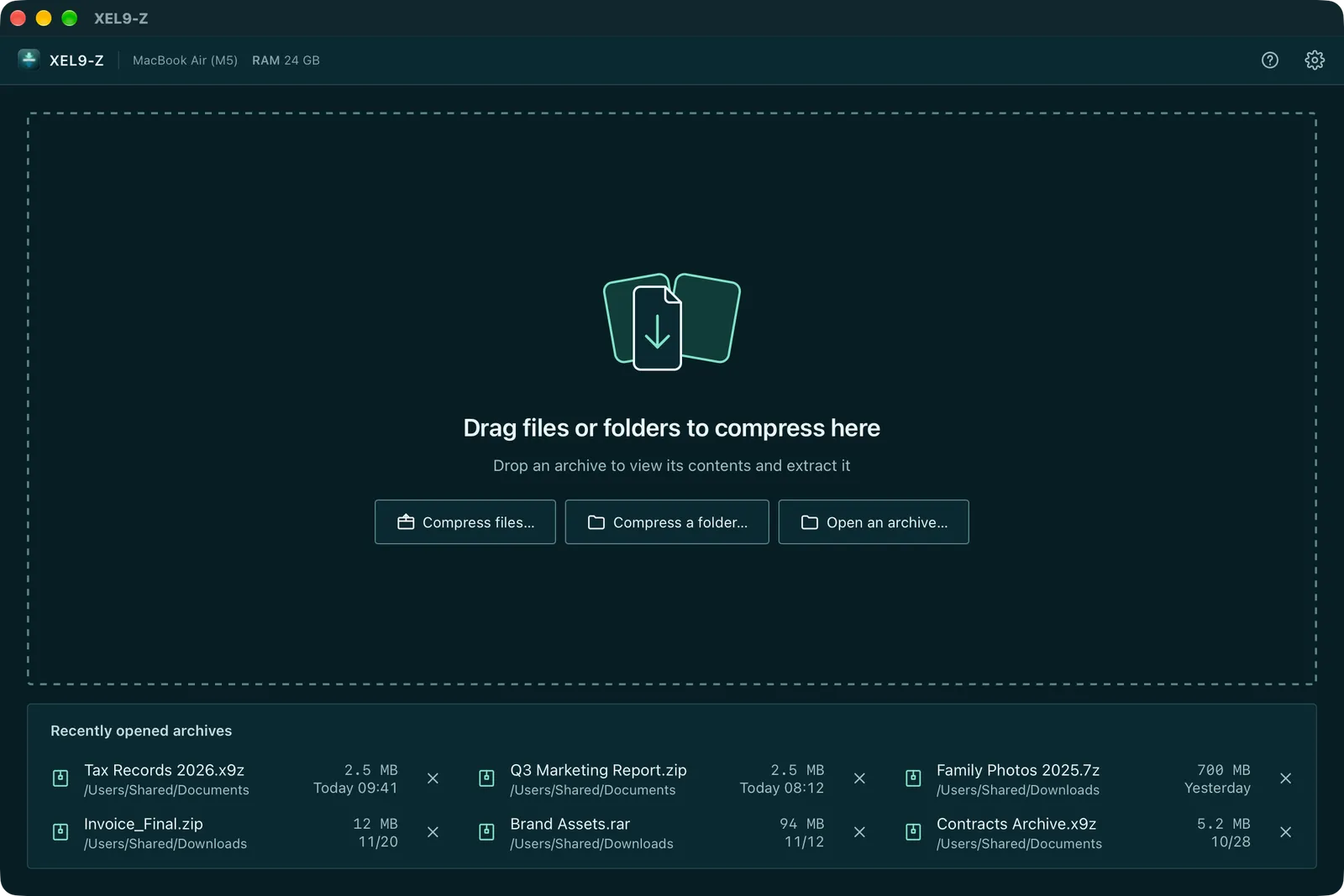
XEL9-Z at a glance

  • Drag and drop to compress or extract right away, and reopen recently opened archives.
    Drag and drop to compress or extract right away, and reopen recently opened archives.
  • Pick ZIP, X9Z or 7Z and set a password, all on one screen.
  • Check the contents and compression ratio before extracting. If there's a dangerous file, it stops without extracting.
  • X9Z vaults encrypt even file names and sizes, so without the password not even the file list shows.
  • Pick Dark or Light, or leave it on “Auto” to follow your system setting.

DOWNLOAD

Get the file for your operating system

Links always point to the most recent release.

Windows installers are signed by the publisher 1Pixel Inc. After installing, you can keep it up to date in the app under Settings → Update.Release notes

CLEAN & FLEXIBLE

No ads, and it works the way you want

No ads, no payment prompts

There are no ads in the program, and no windows asking you to upgrade or pay.

Both an app (GUI) and a command line (CLI)

You get a desktop app to use with the mouse and a command-line tool for scripts and server work. Both are in the download section below, and the app comes in 24 languages.

LICENSE

Terms of use

Individuals, companies, schools and public institutions may all install and use it freely, with no separate permission.

Free for everyone

This program is provided as is. The author is not responsible for data loss or any other problem arising from its use. Keep a separate backup of important files.

Limitation of liability

FAQ

Frequently asked questions

Is XEL9-Z free?

Yes. Individuals, companies, schools and public institutions can all install and use it for free, with no separate permission. There are no ads and no payment prompts.

Can XEL9-Z replace WinRAR, 7-Zip, WinZip, Bandizip or The Unarchiver?

Yes. XEL9-Z is a free alternative to WinRAR, 7-Zip, WinZip, Bandizip, ALZip, PeaZip, NanaZip, Keka and The Unarchiver. It opens common archives such as zip, rar, 7z and ALZip (alz · egg) on Windows, macOS and Linux, with no ads.

Is there a free alternative to Keka or The Unarchiver on Mac?

XEL9-Z is a free Mac alternative to Keka, The Unarchiver, BetterZip and Archive Utility. It runs on macOS 11 or later on both Apple silicon and Intel Macs, opens zip, rar, 7z and ALZip (alz · egg), and creates password-protected zip and 7z.

How do I open ALZip (alz · egg) files?

Open the .alz or .egg file with XEL9-Z, or drag it onto the window, and extract it right away. For an archive split into several parts, open any part and it finds and joins the rest.

How do I extract RAR files?

Open the RAR file with XEL9-Z to see its contents and extract it. Creating new RAR archives is not supported.

Can it open 7z and password-protected ZIP files?

Yes. It can also create ZIP and 7z archives with a password.

Which operating systems are supported?

Windows 10 and 11 (64-bit), macOS 11 or later, and Linux (64-bit PC). A command-line tool (CLI) for developers and servers is included too.

How is X9Z different from a password-protected ZIP?

X9Z (.x9z) always hides the names and sizes of the files inside, and detects even the smallest change to the archive.

How do I install and run the command-line tool (CLI)?

The command-line tool x9z comes with the installers. On Windows, use x9z in a newly opened terminal after installing. On macOS, go to the app's Settings → Terminal command (x9z) and click the button to use x9z in the terminal. On Linux, the deb and rpm packages make it available right away; for the AppImage, use the same Settings button or run XEL9-Z.AppImage --x9z. Run x9z --help to see the commands.

Command-line (x9z) commands

Run these in a terminal. Replace the file and folder names with your own.

Extract and view

x9z unpack file.zip -d folder
Extract a vault, or safely extract an archive (zip, 7z, rar, alz, egg, iso, dmg, tar.gz …) into the folder.
x9z unpack file.zip -d folder --smart
“Extract here”: a single top-level item comes out as is, several go into a new folder named after the archive. Nothing that exists is replaced.
x9z unpack file.zip -d folder -f
Overwrite existing files.
x9z unpack docs.x9z -d folder --only docs/report.pdf
Vaults: extract only this path (repeatable).
x9z list file.zip
List the contents of a vault or archive.
x9z info docs.x9z
Show a vault's header (no password needed).
x9z verify file.zip
Check a file: a vault is authenticated byte by byte, an archive is read through with its own checks.

Create regular archives

x9z compress folder -o out.zip
Create a regular archive; the format follows the extension (zip, 7z, tar, tar.gz, tar.bz2, tar.xz, tar.zst, tar.lz4).
x9z compress folder -o out.7z --password
zip/7z only: protect with a password, asked at the prompt (weaker than a vault).
x9z compress folder -o out.zip --split 700m
Split the result into pieces of this size: out.001, out.002 …
x9z compress a.txt --format gz
Compress one file on its own (gz, bz2, xz, zst, lz4): a.txt → a.txt.gz
x9z compress folder -o disc.iso
Create a CD/DVD disc image (iso).

X9Z encrypted vaults

x9z pack folder -o docs.x9z
Create an encrypted X9Z vault; asks for the password.
x9z add docs.x9z new-files
Add files or folders to a vault without repacking it (--replace replaces existing entries).
x9z remove docs.x9z docs/old.pdf
Remove entries (and everything below a folder) from a vault.
x9z sync docs.x9z folder
Make the vault match the folder: add new and changed files, remove deleted ones.
x9z compact docs.x9z
Reclaim the space used by removed or replaced data.
x9z pack folder -o docs.x9z --recovery 5%
Add a recovery record (1–30%) so damage can be repaired.
x9z repair docs.x9z
Rebuild a damaged vault from its recovery record → docs.repaired.x9z (no password needed).
x9z pack folder -o docs.x9z --sfx
Create a self-extracting Windows program (.exe) that opens without XEL9-Z.
x9z sfx docs.x9z
Turn an existing vault into a self-extracting program → docs.exe

Passwords, keys and signatures

x9z passwd docs.x9z
Change the password (the data is not re-encrypted).
x9z pack folder -o docs.x9z -k recovery.key
Use a key file, alone or with a password.
x9z keygen -o alice
Create an identity: alice.x9id (keep it secret) and alice.x9pub (to share).
x9z pack folder -o docs.x9z --to bob.x9pub
Add a recipient who can open the vault with their identity (repeatable).
x9z pack folder -o docs.x9z --sign alice.x9id
Sign the vault with your identity.
x9z unpack docs.x9z -d folder --signer alice.x9pub
Extract only if the vault has a valid signature by this key.
x9z rekey docs.x9z --remove 1
Add or remove passwords, key files and recipients (--add-password, --add-keyfile, --to, --remove; slot numbers are in x9z info).

Other

x9z --help
List all commands.
x9z unpack --help
Show the options of one command.
x9z version
Print the version.
--cpu 50%
CPU to use: auto (all cores but one), all, a percentage of the cores, or a thread count.
--background
Run at low priority so other programs stay responsive.
--json
Machine-readable output: list, info and sync results and errors as JSON.

Passwords are never written on the command line. You type them when asked, or scripts use --password-stdin or a key file (-k).